
Z-Banding – Horizontal Surface Lines
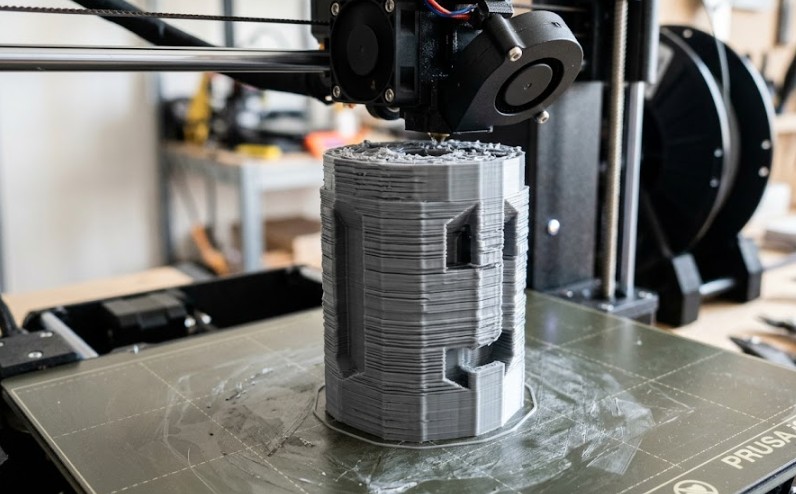
Repeating striped pattern has specific causes and solutions.
Z-banding is a visual defect – regular horizontal stripes or ripples on the surface:
🔍 Most common causes: • Eccentric (bent) Z-axis leadscrew • Faulty or over-tightened rolling elements (wheels, bearings) • Uneven Z motor steps (electrical interference) • Vibration during printing (weak frame, soft table) • Incorrectly calibrated Z steps
🔧 Diagnostics: • Pattern every ~4 mm → leadscrew problem (4 mm pitch) • Random lines → vibration or interference • Single line → bad layer (jamming, slipping)
✅ Solutions: • Center the leadscrew – must not be tight during movement • Loosen the top Z-axis bracket (let it float freely) • Check and replace leadscrew if visibly bent • Lubricate leadscrew (plastic lubricant, not WD-40) • Tighten printer frame and support with dampers • Reduce Z motor currents (if Klipper/Marlin)
💡 Tip: Dual Z-axis printers (Ender 3 V2, Prusa MK4) have significantly less Z-banding.